How Best to Use EvidenceTableBuilder for Systematic Literature Reviews
TL;DR
EvidenceTableBuilder.com works best when you treat it as a structured data extraction tool, not a summariser.
- It fits into the selection and data extraction stages of a systematic literature review, anywhere you need to compare studies side-by-side.
- Upload up to 20 PDFs at a time and define clear, precise data points — each question becomes one column in your evidence table.
- Avoid vague questions. Always ask: “What would I need for analysis later?”
- Use single-responsibility questions, specify units, and separate baseline and follow-up values into different questions.
- Short, clean PDFs (ideally under ~10 pages) give the most reliable results.
- Clear questions in = clean evidence tables out. Vague questions lead to messy tables that are hard to analyse.
Used correctly, EvidenceTableBuilder turns PDFs into a structured table of evidence ready for Excel-based analysis, meta-analysis, and regulatory or HTA workflows.
Evidence synthesis in pharma, HEOR, and market access is rarely about reading papers. It’s about comparing, contrasting, and structuring data so it can be analysed, defended, and reused.
That’s exactly where EvidenceTableBuilder.com fits in.
This guide walks through:
- where Evidence Table Builder sits in a standard systematic literature review (SLR),
- how to use it effectively as an AI table generator,
- and how to avoid the most common mistake we see: asking vague questions.
Where EvidenceTableBuilder Fits in the SLR Workflow
A typical systematic literature review follows a familiar structure:
-
Define the research question Clearly specify population, intervention, comparator, outcomes, and study design.
-
Design and run the search strategy Execute reproducible searches across databases such as PubMed, Embase, and Web of Science.
-
Study selection (screening) Title/abstract screening followed by full-text review to identify eligible studies.
-
Data extraction and evidence table creation Extract structured data so studies can be compared side-by-side.
EvidenceTableBuilder is designed to support selection and data extraction any point where you need to systematically compare research papers and turn unstructured PDFs into a clean table of evidence.
What EvidenceTableBuilder Actually Does
At its core, EvidenceTableBuilder is an instant data scraper purpose-built for research workflows.
You:
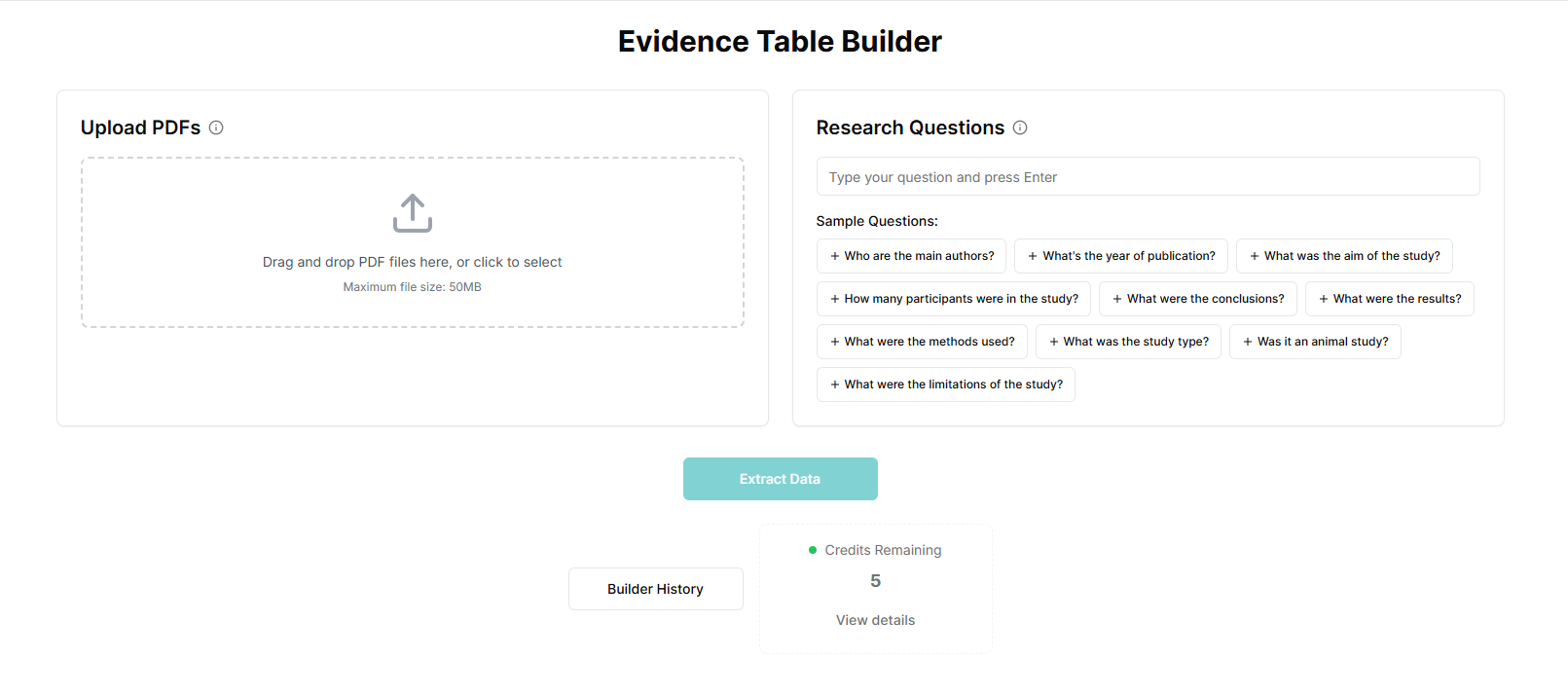
- upload your PDFs (up to 20 at a time),
- define the exact data points you want to extract,
- and let the AI systematically read each paper and place the extracted data into an Excel file.
The output:
- Each row = one uploaded study
- Each column = one clearly defined data point
If you need to verify and defend extracted values, this feature is built for that: The Most Requested Feature Is Finally Here: Audit Trails.
This creates a structured AI-generated evidence table that can be used directly for:
- early scoping comparisons,
- full data extraction for meta-analysis,
- regulatory or HTA evidence tables.
How to design evidence tables properly
AI Summarizer vs Data Extraction Tool (Why Tables Beat Summaries)
An AI summarizer helps you understand a paper faster.
A data extraction tool helps you turn many papers into a structured dataset you can compare, quality-check, and analyse.
In systematic reviews, HEOR, and HTA workflows, summaries don’t replace evidence tables because you typically need:
- consistent variables across studies (columns),
- explicit timepoints and units,
- effect sizes / denominators you can validate,
- and traceability for high-stakes numbers.
If you’re designing your table schema, start with: What Columns Should an Evidence Table for a Systematic Review Include?.
A Simple Walkthrough
Step 1: Upload your PDFs
Upload up to 20 studies per run. Best results are typically seen with short, clean PDFs (ideally under 10 pages), though longer documents can still work.
If you want the quickest end-to-end walkthrough first, use: Quick Start Guide: Evidence Table Builder.
Each PDF becomes one row in your final Excel file.
Step 2: Define your extraction questions
This is the most important step.
Each question you write becomes one column in your evidence table.
Think of EvidenceTableBuilder as an AI for research, not a summarisation tool. It performs best when you ask it to extract specific, analysable variables, not general descriptions.
Step 3: Run the extraction
The AI reads each PDF, finds the relevant information, and populates the table.
Step 4: Download your Excel file
You receive a clean, structured evidence table ready for analysis, review, or regulatory use.
Data Extraction Form Design: Turning Questions Into Columns
Think of your data extraction form as the blueprint for your evidence table.
In EvidenceTableBuilder, the rule is simple: one question = one column. So before you scale up extraction, define:
- the outcomes that matter (and the timepoints),
- the study/population variables you’ll need for subgrouping,
- the effect measures you’ll analyse (and the units),
- and any decision rules (e.g., ITT vs per-protocol, preferred instrument).
If you want a structured way to do this backwards from analysis (instead of “whatever is easy to copy from PDFs”), use: Analysis-Driven Design of Evidence Tables.
How to Write Good Extraction Questions
1. Use single-responsibility questions
Each question should extract one clearly defined variable.
- ❌ “Extract patient demographics and outcomes.”
- ✅ “Extract mean age (years) at baseline.”
- ✅ “Extract percentage of male participants.”
Each variable = one column.
2. Always separate baseline and follow-up
Do not combine timepoints.
- ❌ “Extract HbA1c at baseline and follow-up.”
- ✅ “Extract HbA1c (%) at baseline.”
- ✅ “Extract HbA1c (%) at final follow-up.”
This keeps your table analysable and avoids mixed values.
3. Specify units and context
Never assume units.
- ❌ “Extract creatinine levels.”
- ✅ “Extract serum creatinine (µmol/L) at baseline.”
This is especially important for regulatory and HTA tables, where unit consistency matters.
4. Think ahead to analysis
Before running the extraction, imagine opening the Excel file.
Ask yourself:
- Can I sort this column?
- Can I compare values across studies?
- Can I feed this directly into statistical analysis?
If the answer is “not really,” the question needs tightening.
Why Question Quality Matters So Much
EvidenceTableBuilder follows a simple principle:
Junk questions in → junk out.
When questions are vague:
- evidence tables become inconsistent,
- columns mix multiple concepts,
- downstream analysis becomes harder, not easier.
This doesn’t just slow things down it creates risk. Messy evidence tables are difficult to validate, defend, or reuse in regulatory or market access contexts. Working backwards from the analysis stage is best practice.
PDF Preparation: Keep It Simple
You don’t need complex preprocessing.
That said, best performance is typically seen when:
- PDFs are text-selectable (not scanned images but it will still work non the less with our computer vision AI),
- documents are under ~10 pages,
- and each PDF contains a single study.
Splitting very long papers into smaller sections can sometimes improve clarity, but preparation should remain minimal.
Where EvidenceTableBuilder Adds the Most Value
Teams use EvidenceTableBuilder successfully for:
- early scoping comparisons across interventions,
- structured outcome extraction for meta-analysis,
- regulatory and HTA tables of evidence,
- internal landscape reviews and gap analyses.
Anywhere structured comparison is required, an AI table generator outperforms manual copy-paste.
Final Thought
EvidenceTableBuilder doesn’t replace methodological thinking. It amplifies it.
When you:
- know what data you’ll need later,
- ask precise, single-responsibility questions,
- and treat the tool as a structured data scraper, not a summariser,
you get clean, analysable evidence tables fast.
Used well, it removes hours (or days) of manual extraction and lets teams focus on interpretation, synthesis, and decision-making the parts that actually require expertise.
That’s where AI for research works best.
Related reading
- Quick Start Guide: Evidence Table Builder
- The Most Requested Feature Is Finally Here: Audit Trails
- Best Practices for Data Extraction in Systematic Reviews
- Analysis-Driven Design of Evidence Tables
- What Columns Should an Evidence Table for a Systematic Review Include?
Great resources:
Tags:

About the Author
Connect on LinkedInGeorge Burchell
George Burchell is a specialist in systematic literature reviews and scientific evidence synthesis with significant expertise in integrating advanced AI technologies and automation tools into the research process. With over four years of consulting and practical experience, he has developed and led multiple projects focused on accelerating and refining the workflow for systematic reviews within medical and scientific research.